🪜 Stages & Pipeline Management
Stages define the lifecycle of a lead. By mapping out your sales process into distinct steps, you can visualize your pipeline health and track the “Probability” of conversion at every level.
🏗️ Understanding Pipeline Stages
The system uses a probability-based model to rank stages. The list is automatically sorted from lowest to highest probability, representing a lead’s journey from a “Cold” prospect to a “Won” customer.
1. System Default Stages
To ensure core functionality, the system automatically creates three “Protected” stages. These are essential for reporting and cannot be edited or deleted:
- Initial (10%): The entry point for every new lead.
- Lost (0%): Used when a lead is disqualified or the deal fails.
- Won (100%): Used when a lead successfully converts into a customer.
2. Custom Stages
You can add your own milestones (e.g., Follow-up, Demo Scheduled, Negotiation) to match your specific business workflow.
- Limit: To keep your pipeline focused and efficient, the system allows a maximum of 10 stages.
🛠️ Configuring a Stage
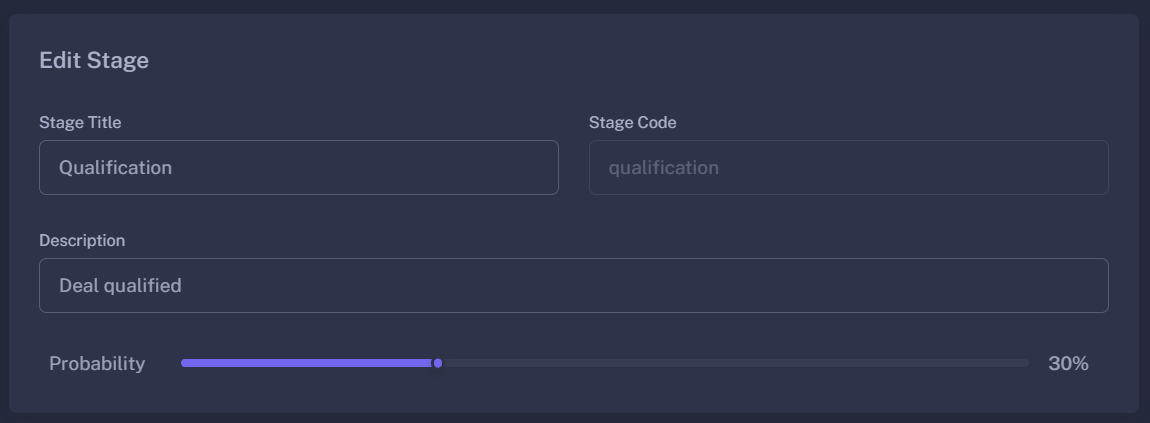
When creating or editing a stage, you define how it impacts the pipeline:
| Property | Description |
|---|---|
| Stage Title | The name displayed to agents (e.g., Proposal Sent). |
| Stage Code | The internal ID. For new stages, this is auto-generated based on the title (e.g., proposal_sent). |
| Description | A short note explaining the criteria for a lead to move into this stage. |
| Probability (%) | Use the Probability Slider to set the likelihood of conversion. This value is used by the Dashboard to calculate “Weighted Revenue.” |
🚦 Pipeline Rules & Logic
- Probability Slider: The UI uses a smart slider with 5% increments, allowing you to fine-tune your funnel accuracy.
- Automatic Sorting: Your stages list and the “Stage Overview” on the Dashboard are always sorted by probability. This ensures that as a lead progresses, they naturally move “Up” the funnel.
- Deletions: You can only delete custom stages. If you delete a stage that currently contains active leads, ensure those leads are moved to a different stage first to prevent data gaps.
🚀 Strategic Benefits
- Standardized Sales Process: Ensure every agent follows the same path, from
InitialtoWon. - Predictive Forecasting: By assigning a percentage to stages like “Negotiation (80%)”, you can predict future revenue based on current lead volume.
- Identify Bottlenecks: If your Dashboard shows 50 leads in “Initial” but only 2 in “Follow-up,” you know where your team needs to focus their efforts.
Stages turn a messy list of contacts into a structured, predictable sales engine.