🚦 Statuses
Statuses define the operational journey of a feedback entry. By setting up a structured workflow, you ensure that every customer response is tracked, assigned, and eventually “Closed,” providing a clear audit trail of your service recovery efforts.
🏗️ Understanding Workflow Statuses
The system uses a status-based workflow to manage the transition of feedback from initial capture to final resolution.
1. System Default Statuses
To ensure the Feedback module functions correctly out of the box, the system automatically synchronizes three “Protected” statuses. These are essential for core analytics and cannot be edited or deleted:
- New: The default entry point for all incoming feedback.
- Active: Indicates that the feedback is currently being reviewed or worked on by an agent.
- Positive: A terminal status for feedback that represents a satisfied customer or a successful resolution.
2. Custom Statuses
You can define your own internal milestones (e.g., Under Investigation, Pending Customer, Escalated) to match your organization’s specific support hierarchy.
- Limit: To maintain a streamlined workflow, the system allows a maximum of 10 statuses.
🛠️ Configuring a Status
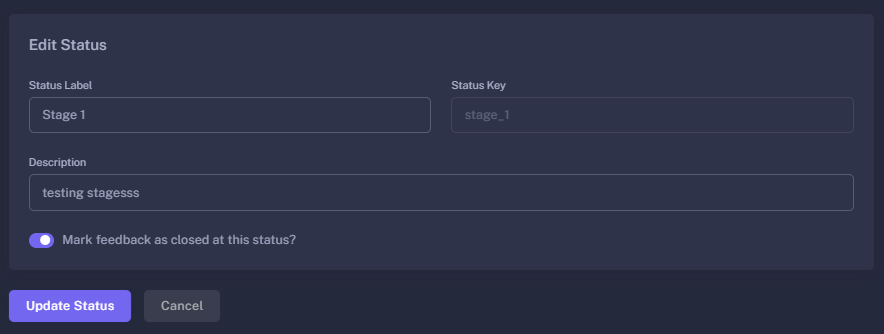
When creating or editing a status, you define its role in the workflow:
| Property | Description |
|---|---|
| Status Label | The display name used across the platform (e.g., In Progress). |
| Status Key | The internal system ID. For new statuses, this is auto-generated from the label (e.g., in_progress). |
| Description | A short note explaining when a feedback entry should be moved to this status. |
| Auto Close | A critical toggle that determines if reaching this status marks the feedback as “Closed” in your reports. |
🔒 The “Auto Close” Feature
The Auto Close (Closure) property is the engine behind your “Closed Loop” analytics.
- Closure = Yes: When feedback is moved to this status (like Positive or Resolved), the system automatically flags it as Closed. This stops the clock on resolution time tracking and updates the “Closed” column in your Feedbacks List.
- Closure = No: The feedback remains “Open” and requires further action from your team.
🚦 Workflow Rules & Logic
- Default Protection: Default statuses (New, Active, Positive) feature a disabled edit/delete icon to prevent workflow breakage.
- Automatic Key Generation: To keep data consistent, the system generates a unique internal key based on your label. Once a status is created, the key is locked to maintain historical data integrity.
- Capacity Management: If you reach the 10-status limit, the “Create Status” button will disable, and a tooltip will remind you of the system limit.
🚀 Strategic Benefits
- Accountability: Know exactly who is handling a “New” ticket and how long it has been “Active.”
- Operational Clarity: Use custom statuses like “Escalated” to flag high-priority issues that need management attention.
- Accurate Reporting: By utilizing the Auto Close feature, your Dashboard will always reflect an accurate “Resolution Rate,” helping you measure team efficiency.
Statuses turn customer comments into a professional, trackable support ticket system.